AWS SAM CDK locally
Running AWS CDK applications with SAM locally
published: Tue, 27 Dec 2022
estimated reading time: 1 minute
In this post we will make an AWS lambda function with python and CDK and run it locally with AWS SAM.
Prerequisite
Create lambda function with CDK
Create an empty directory and initialize a CDK template.
mkdir cdk-sam-lambda
cd cdk-sam-lambda
cdk init app --language python
Activate the virtualenv, upgrade pip and install the dependencies.
source .venv/bin/activate
pip install --upgrade pip
pip install -r requirements.txt
pip install -r requirements-dev.txt
In cdk_sam_lambda_stack.py add the following code to get a basic lambda function.
|
|
Create my_code directory with an app.py file.
mkdir my_code
cd my_code
touch app.py
Add the following code to app.py.
|
|
Run lambda locally with SAM
Generate the cloudformation from CDK.
cdk synth --no-staging
Generate a test even with SAM.
sam local generate-event apigateway aws-proxy > apigateway_testevent.json
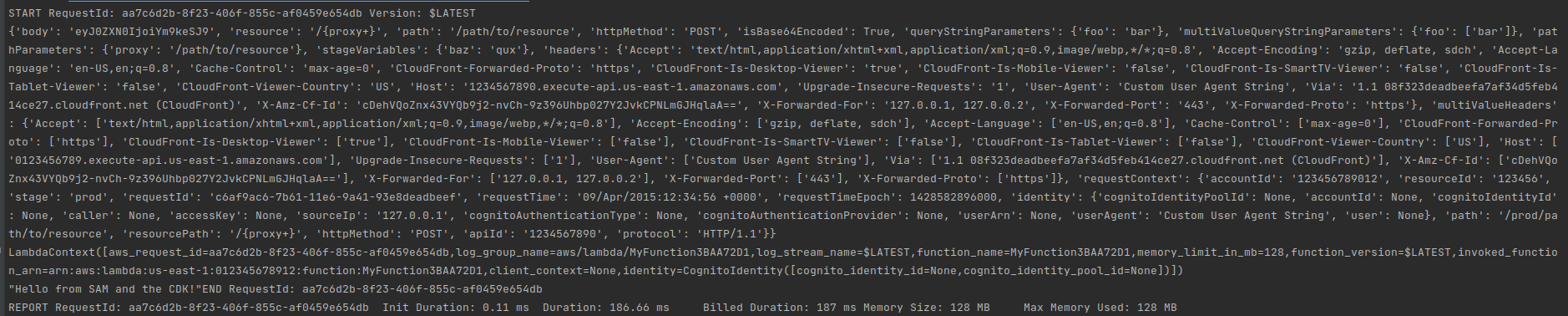
Run the lambda locally with the generated event.
sam local invoke MyFunction ./apigateway_testevent.json -t ./cdk.out/CdkSamLambdaStack.template.json
The output should look something like this.